You're Wasting 40% of Your AI Time on Copy-Paste
Key Takeaways
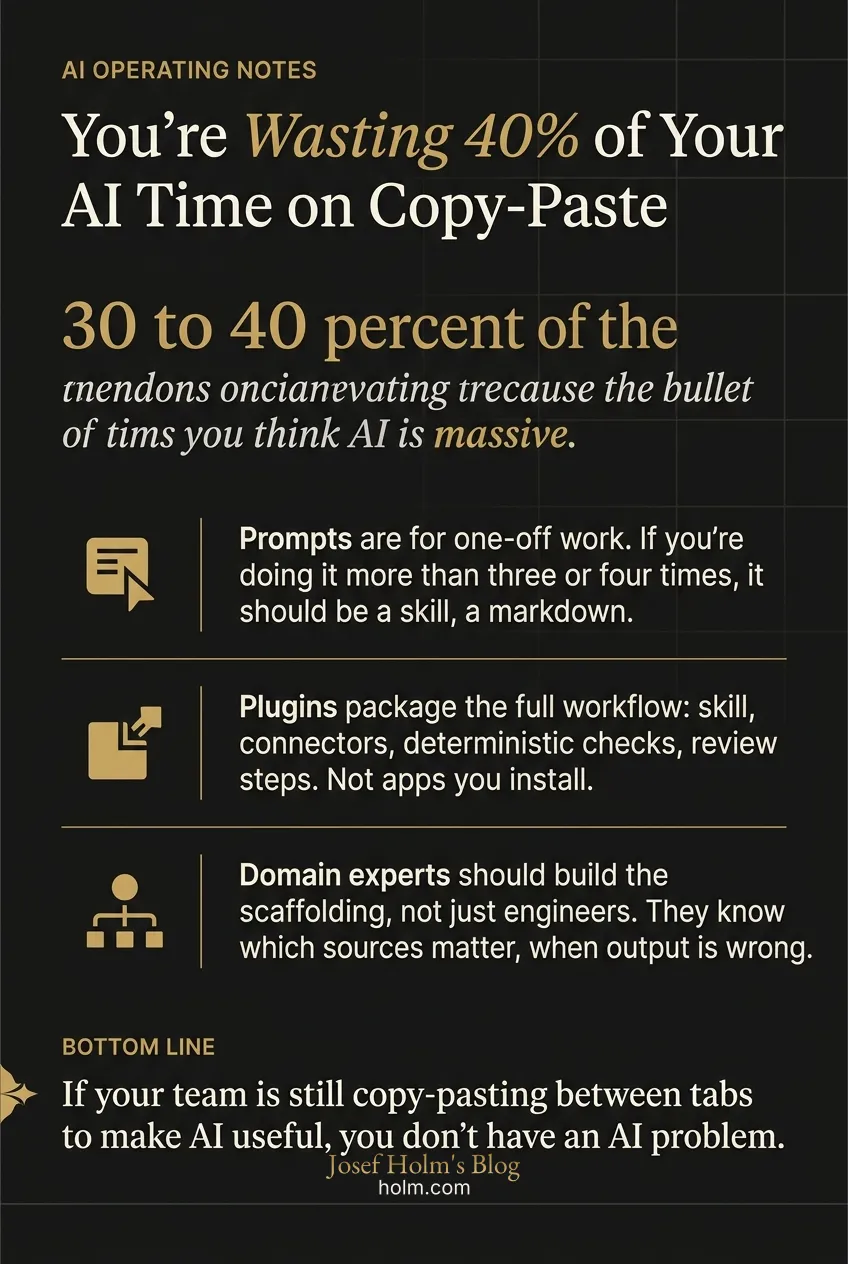
- Acting as human glue between an LLM and your tools eats 30 to 40 percent of the time you think AI is saving you.
- Prompts are for one-off work. If you're doing it more than three or four times, it should be a skill, a markdown document that encodes how you do that work.
- Plugins package the full workflow: skill, connectors, deterministic checks, review steps. Not apps you install. Workflows you encode.
- Domain experts should build the scaffolding, not just engineers. They know which sources matter, when output is wrong, and which steps get skipped.
- If your team is still copy-pasting between tabs to make AI useful, you don't have an AI problem. You have a packaging problem. And it's fixable this quarter.
You're Wasting 40% Of Your AI Time On Something Fixable
Most teams using AI right now are still hand-stitching the same workflow every morning. Copy from Salesforce. Paste into Claude. Ask it to reason. Pull data from Slack. Re-prompt. Check the output. Fix it. Send it.
That isn't AI work. That's a person acting as the connective tissue between an LLM and the rest of the company. And it eats 30 to 40 percent of the time people think they're "saving" with AI.
The fix isn't a smarter model. It's the use around the model. Prompts, skills, plugins, MCPs, connectors, hooks, scripts. None of these compete with each other. They stack. Once a non-technical operator sees how they stack, they can package their own work and stop redoing it every day.
Nobody is teaching this part clearly. So let me lay it out the way I'd explain it to an executive team.
Why does the scaffolding matter more than the model?
The model is the engine. The scaffolding is the car.
Best engine in the world doesn't matter without a chassis, wheels, and a steering column. That's where most companies sit right now. They have access to GPT-5.5 or Claude or Codex, and they treat it like a chat toy instead of a system.
The real shift in 2026 isn't that models got smarter. They did, but that's not the story. The story is that the tooling around the model has matured to the point where non-engineers can now build the apply themselves. The people who actually know the work, the editors, the analysts, the operators, can encode that knowledge into something an agent runs reliably.
That changes who builds AI inside a company. Bigger deal than any model release.
When should something just be a prompt?
A prompt is for one-off work. That's it.
Writing a single client note with custom backstory? Prompt. Asking the model to summarize one document for a meeting in 20 minutes? Prompt. Brainstorming a name for a project once? Prompt.
Here's where people get it wrong. They stuff their entire workflow into prompts. They keep a Google Doc full of prompt snippets. They paste the same 800-word context block into a chat 14 times a week. That isn't a prompt anymore. That's a process pretending to be a prompt.
If you're doing it more than three or four times, it shouldn't be a prompt. It should be a skill.
What's a skill, and why does most of your repeat work belong there?
A skill teaches a tool how you do a specific kind of work. It's a markdown document that captures your house style for a process. How you write outbound emails. How you review pull requests. How you draft a board update.
Skills are universal. You don't write a "Claude skill" and a separate "Codex skill." Write the skill once and it travels.
Best part: a skill captures team conventions. So when a new analyst joins, they don't need to absorb your style by osmosis over six months. The skill encodes it.
One warning. There's a power law here. Roughly 20 percent of your potential skills deliver 80 percent of the value. Don't write 40 skills in your first month. Write three. The three processes you do most often, where consistency matters most. Get those right before expanding.
What's a plugin actually, and why is "app store" the wrong way to think about it?
A plugin is workflow packaging. Not an add-on. Not a download.
A skill says how to do the work. A plugin packages the entire workflow, including live data access, tools, review steps, and deterministic checks.
Take the outbound email example. The skill defines what a strong outbound email looks like. The plugin connects to Salesforce to pull the actual client names and context, runs the skill, validates the output, and queues it for review. That's a complete unit of work, packaged once, reusable forever.
The "app store" framing kills the actual value here. Plugins aren't apps you install. They're workflows you encode. The right question isn't "what plugins should I download?" The right question is "what part of my work has enough repeatable structure that the agent should inherit it?"
If you're already acting as a human plugin, copying, pasting, prompting, checking, looping, you're describing a plugin that should exist. You just haven't built it yet.
This is exactly the kind of integration discipline we work on inside our operator note engagements. Not bolting AI onto a company. Encoding the actual work.
Where do MCPs, connectors, hooks, and scripts fit?
Think of MCPs and app connectors as the plugs. They give the agent access to the systems where the work lives. Salesforce, Slack, Figma, GitHub, your CRM, your data warehouse. SaaS vendors are increasingly shipping their own MCPs, so you don't have to build them yourself.
An MCP is not a plugin. A plugin can contain an MCP. That distinction matters because people keep conflating them.
Hooks and scripts are a different animal. They handle the parts of the workflow that should not be left to the model's judgment. Some things should be deterministic, full stop.
- If code needs formatting, run a formatter. Don't ask the model.
- If a schema needs validation, validate it programmatically.
- If tests need to pass, run the tests.
- If output needs to be valid JSON, check it with code.
- If a human review must happen before completion, build it into the loop.
Leadership often gets confused here. A CEO asks "why aren't you using AI for this?" and the engineer is right to say, "because this part needs to be deterministic." Not everything should pass through an LLM. Some things should stay scripts. Some things should stay human.
That's not resistance to AI. That's good engineering.
How do you know where to draw the boundaries?
This is the most undervalued skill in 2026. Knowing what counts as a single coherent unit of work.
Take customer service at a small company. You could build one giant "customer service" plugin. Wrong instinct. Too broad, too many jobs, too much ambiguity for the agent.
Better: three plugins. One for refunds. One for activation. One for upgrades. Each has one clear job with defined edges. Each can be tested, improved, and shipped independently.
Drawing those semantic boundaries correctly is the difference between AI that works and AI that almost works. It's the kind of judgment we look at first in an AI readiness note, because most companies have the tools but haven't decided where one workflow ends and the next begins.
Who should actually be building this scaffolding?
Not engineering. Not exclusively, anyway.
The people who understand the work should be encoding the work. A non-technical editor I know recently built a plugin for first-pass editorial review. It reads text three different ways and flags rough passages, factual inconsistencies, and incoherent sections. It didn't replace her judgment. It saved her hours every week. She built it because she knew what good editing looked like. An engineer wouldn't have known that.
Same for design teams pulling Figma context to generate work in their existing style. Same for finance teams packaging a weekly report that combines spreadsheets, Slack threads, dashboards, and prior reports into one workflow.
Anthropic turned Claude Design into a full product because the underlying plugin was so valuable. That's the pattern. Domain experts encode their knowledge. Sometimes those plugins become products.
If scaffolding stays an engineering black box, only engineers can build it. And engineers don't know which sources matter, when output is wrong, or which steps get skipped. Domain experts do. That's what makes a plugin valuable.
The decision framework, in plain terms
- Doing it once: prompt.
- Doing it repeatedly with consistent structure: skill.
- Workflow needs to travel, be installed by others, or include tools and connectors: plugin.
- Need access to another system or live data: MCP or connector, usually nested inside a plugin.
- Workflow must be verified or has deterministic requirements: script or hook, usually inside a plugin.
- Final judgment calls: keep them human.
The goal isn't to turn everything into a plugin. The goal is to stop wasting time on work that should have been packaged six months ago.
Why does leadership need this mental model?
Without it, the conversations between executives and engineering teams stay misaligned. A CEO who doesn't understand the put to work will keep pushing for "more AI" in places where deterministic code is the right answer. An engineer without executive air cover will keep building one-off scripts instead of reusable plugins.
Both sides need the same vocabulary. Prompt, skill, plugin, MCP, hook. What goes where. What stays human. What gets verified by code.
Once the leadership team shares that model, AI transformation stops being a vague initiative and starts being a series of small, shippable decisions. Which workflows to package first. Which to leave alone. Which to keep human.
That's the work. Not chasing the next model release. Building the capture around the one you already have.
If your team is still copy-pasting between tabs to make AI useful, you don't have an AI problem. You have a packaging problem. And it's fixable this quarter.
Infographic
Frequently Asked Questions
- What's the difference between a prompt and a skill?
- A prompt is for one-off work. Writing a single client note, summarizing one document, brainstorming a project name once. If you find yourself doing the same thing more than three or four times, it shouldn't be a prompt. It should be a skill, a markdown document that captures how you do that specific work so the tool can do it consistently.
- What is a plugin and how is it different from a skill?
- A skill says how to do the work. A plugin packages the entire workflow, including live data access, tools, review steps, and deterministic checks. The skill defines what a strong outbound email looks like. The plugin connects to Salesforce, runs the skill, validates the output, and queues it for review. Plugins aren't apps you install. They're workflows you encode.
- Where do MCPs and connectors fit?
- MCPs and app connectors are the plugs. They give the agent access to the systems where the work lives, like Salesforce, Slack, GitHub, or your data warehouse. An MCP is not a plugin. A plugin can contain an MCP. SaaS vendors are increasingly shipping their own MCPs, so you don't have to build them.
- When should AI not be used at all?
- When the work needs to be deterministic. Run a formatter for code formatting. Validate schemas programmatically. Run tests with code. Check JSON validity with code. Build human review into the loop when judgment matters. That's not resistance to AI. That's good engineering.
- Who should be building plugins inside a company?
- Not just engineering. The people who understand the work should be encoding the work. Editors, analysts, designers, finance teams. They know which sources matter, when output is wrong, and which steps get skipped. Engineers don't. If scaffolding stays an engineering black box, only engineers can build it, and the plugins won't be valuable.
- How do you decide where one workflow ends and the next begins?
- Don't build one giant plugin for a broad function like customer service. Break it into smaller units with clear edges. Refunds is one plugin. Activation is another. Upgrades is a third. Each can be tested, improved, and shipped independently. Drawing those boundaries correctly is the difference between AI that works and AI that almost works.